New capabilities, better capture quality, and changes worth knowing about if you build on our exports or our API.
Latest
Faster exports, and clear answers when something fails
Extra exports you ask for on a finished take now start right away, even when other videos are being processed. And when you drive Mocai from code, every take now says plainly what happened: which version made it, whether an export failed, and whether a failure is final.
Another format, keypoints or a rig retarget requested on a ready take no longer waits behind the processing queue. It usually arrives within seconds, or a minute or so for a long clip.
Keypoint JSON and CSV can now be chosen at upload alongside FBX, GLB, USD and BVH, so they are ready the moment processing finishes. In the portal, the API (exports), MCP and the mocai CLI (--exports).
If an export can't be generated, the take lists it under exportFailures and a take.export_failed webhook fires. The portal, the plugins and the CLI stop waiting and tell you, instead of timing out.
A take only shows Failed once processing has stopped for good. A brief problem that Mocai retries keeps the take Queued, so a failed take never turns into a ready one later, and take.failed fires once.
Every take carries a version, such as 2026.10.26: the processing release that produced it. Compare it with a newer take to see whether an older one predates an upgrade.
Check up to 100 takes in a single request with GET /api/v1/takes?ids=, which counts once against your rate limit. The mocai CLI now polls this way.
Video files that can't be read fail straight away with a clear message, clips over your plan's length limit are turned away within seconds, and BVH files report the exact frame rate (30, not 30.0003).
When you pick specific people at upload, or capture one performer in a busy scene, Mocai now tracks only them, so those takes finish sooner: around twice as fast with several people in frame.
Planted feet that stay planted
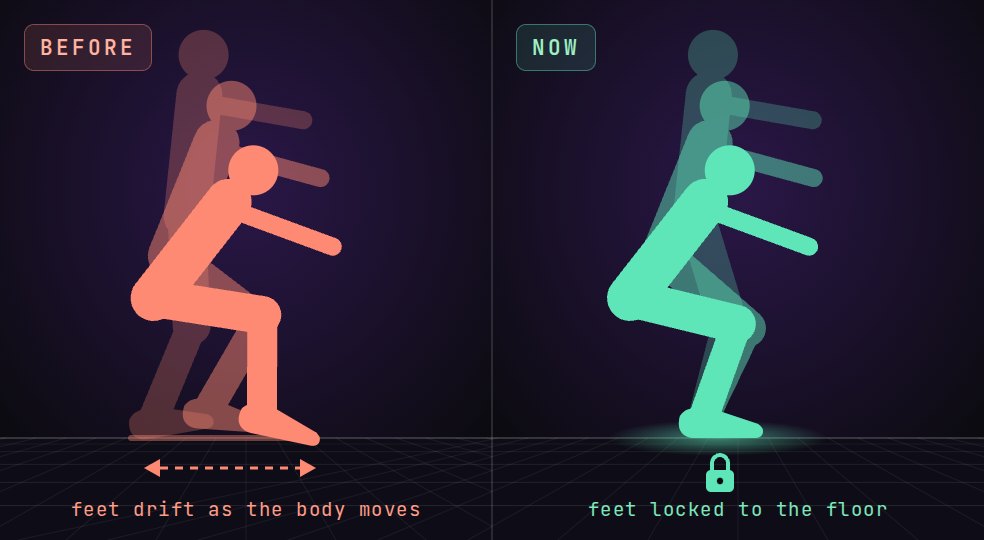
When a foot is planted in your video, it now stays planted in your capture: on the floor, in the same spot, and facing the same way, even while the body bends, squats, lunges or twists above it.
Before, a planted foot could drift as the body moved. Now it stays locked to the floor.
Mocai checks your footage itself to see when each foot is planted. A foot that holds still in the video holds still in your capture, and moves where a foot really slides or pivots, like a moonwalk or a twist on the ball of the foot, keep their motion.
Each foot is held on its own, so both feet stay put through squats and toe touches instead of drifting apart.
Planted feet no longer turn with the knees. Before, a foot could swing 10 to 30 degrees during a squat while it stood still in the video.
Feet stay flat at the bottom of a deep squat instead of lifting at the toes, and crouches, lunges and jump preparation keep their contact with the floor.
The portal viewer shows the same planted feet as your exports.
Applies to everything processed from this date. Takes processed since 25 September already keep floor contact, and since 3 October hold their feet in place as the body bends.
Start your exports on a T-pose or A-pose
A new First frame option adds a T-pose or A-pose before the motion in every skeleton export. Retargeting by hand in Maya or MotionBuilder needs a frame where both skeletons stand in the same pose, and now every take comes with one, so there is no reference pose to key before you start.
Pick Original, T-pose or A-pose when you upload, in the portal, the API (referencePose), the plugins for Blender, Maya, Unreal and Unity, or the mocai CLI (--reference-pose).
Each skeleton gets its own version of the pose: the Mixamo export stands in a true T-pose, and the UE5 and MetaHuman A-poses match Epic's own skeletons.
The pose is frame 0 and the motion starts at frame 1. Original adds nothing, so engine retargeting in Unity or Unreal works exactly as before.
Use Mocai from Claude, ChatGPT and your terminal
AI assistants can now work with your Mocai account directly. Add Mocai as a connector in Claude or ChatGPT and sign in once, or use the new mocai command line tool to turn a whole folder of videos into motion capture with one command.
Connectors: add https://api.mocai.ai/v1/mcp in Claude, ChatGPT or any MCP app and sign in with your Mocai account. No API key to copy. You can see and disconnect connected apps on the Developers page.
The mocai CLI: npx @mocai/cli process clips/ --exports fbx --rigs ue5 uploads every video in the folder, waits for processing and downloads the results. The same tool is on PyPI as mocai.
Agents on your computer: mocai mcp gives Claude Desktop, Claude Code or Cursor a single tool that processes local files and saves the exports next to them. Claude Desktop users can install it as a one-click extension from the Developers page.
A step-by-step walkthrough for every app is on the new Agents page: mocai.ai/agents.
Check your usage from the API and the plugins
You can now see how much footage you've used this month without opening the portal. A new API call returns your plan, minutes used and minutes left, and the Blender, Maya, Unreal and Unity plugins show the same numbers in their panels.
GET /api/v1/account returns your plan, this month's usage (including takes still processing), the minutes you have left, when the counter resets, and the limits that apply to your account. The MCP get_account tool returns the same thing, so AI agents can check before they upload.
In each plugin, the usage line appears under Takes when you hit Refresh and updates whenever a take finishes.
On a custom plan, it also shows any minutes beyond your included amount so far and what they come to.
Faster processing
Motion reconstruction now runs up to about a third faster, so your takes are ready sooner. The biggest gains are on takes with several performers.
Grounded feet and smoother motion
A set of improvements to how motion is reconstructed, applied automatically to everything processed from this date. Takes processed earlier keep their original results.
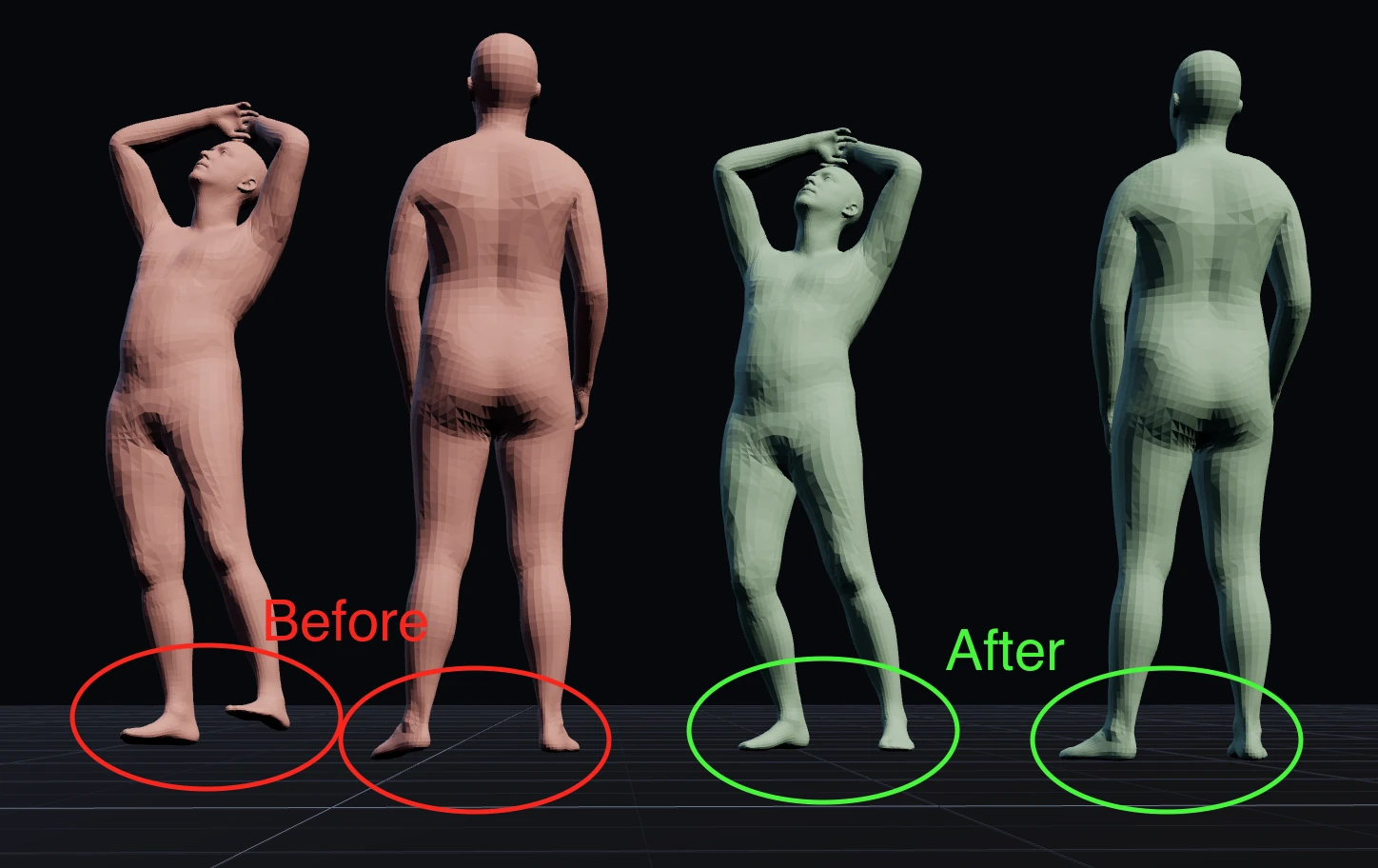
Before and after: planted feet now sit flat on the floor.
Much better grounding: characters stand on the ground far more reliably, with much less floating above the floor or sinking into it. Planted feet sit flatter, and performances done on the spot, like lunges and kicks, stay on the floor much more reliably.
Less jitter across the whole body, while fast movement stays crisp, so strikes, kicks and quick turns keep their snap. Smoothing now behaves the same whether your footage is 24, 30 or 60 fps.
Standing performers are much more upright, correcting the subtle lean that camera angles could introduce.
Spins and twists no longer cause sudden rotation flips in exported files. New BVH files use XYZ rotation order, which standard importers read from the file automatically.
The portal viewer now shows the same grounded, smoothed motion you get in your exports.
Mixamo, UE5 and MetaHuman retargets out of beta
The retarget rigs lost their beta labels after a month in customers' hands. Nothing about how you request them changed.
Skinned characters in every export
FBX, GLB and USD exports now carry the performer's own body mesh skinned to the rig, so engines and DCCs import a real skeletal character instead of a separate skeleton plus a vertex cache.
One file holds the rest mesh, the skin weights and the joint animation, so the character deforms wherever you take it.
The portal viewer shows the skinned performer too, rather than a skeleton.
Unity, Maya and Unreal plugins
Upload a clip and import the result without leaving your tool, joining the Blender add-on that shipped at launch. Each plugin uploads, tracks progress, and imports the finished take straight into the scene.
Native 127-joint rig with true bind poses
Skeleton exports now ship the model's own 127-joint rig: a four-joint spine, twist chains, articulated feet and solved hands.
Every export encodes its real bind pose, so characters arrive calibrated instead of needing zero-rotation fixes on import.
FBX, BVH, GLB and USD all come from one shared path, so the same capture matches across formats.
Export straight onto Mixamo, UE5 and MetaHuman rigs
Retarget a capture onto a standard rig at export time, so it drops into an existing character without a round trip through another tool.
MCP server, and the API on the free plan
An MCP server at /api/v1/mcp lets AI agents upload clips, check takes and fetch exports directly, with the same keys, limits and error codes as the REST API. API access also opened up to the free plan, so you can build against Mocai before paying for it.
Mocai is live
Markerless motion capture from a single camera: upload a clip, get production-ready 3D motion.
A public API with keys, webhooks and a Postman collection, plus a Blender add-on.
Pick who to capture from the first frame, with multi-person and hand capture.
Finger-articulated exports in FBX, GLB, BVH and USD, with USD mesh animation.
Per-take smoothing you control, set to off, standard or strong.